Die-Cutting Explanied
If you work with printed materials, you’ve probably come across products that are cut to a distinctive shape. You may already be familiar with the term die-cutting, but not fully aware of what the process involves, when to use it, or how to get the best results. This guide provides a clear, jargon-free overview to help you understand die-cutting and make confident choices for your print projects.
- Die-cutting creates custom shapes and structural features in print, offering a more memorable and functional result than standard straight edges.
- Best for medium to large quantities of paper or card products, as the one-time die cost becomes more economical across repeat use.
- Digital cutting is ideal for short runs or prototypes, as no physical die is required.
- Use a cutter guide when designing artwork and keep text away from the cut edge to ensure a clean, professional finish.
- Choose die-cutting for impact or function — from shaped marketing materials to folders, packaging and creative print projects.
What Is Die-Cutting?
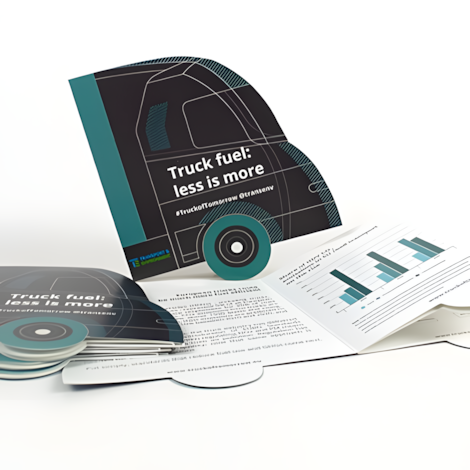
Die-cutting is a print finishing technique used to cut printed sheets into custom shapes with accuracy and consistency. It goes beyond standard rectangular print to create more memorable and practical results — from shaped marketing materials to packaging and presentation folders.
The process uses a die (sometimes called a punch block), which is a wooden board fitted with a thin, sharpened metal blade. This blade is bent to match the exact outline of your required shape. Once assembled, the die is placed into a die-cutting machine and pressed against your printed sheets, cutting the shape cleanly and instantly.
Because the same die can be used repeatedly, die-cutting is particularly efficient for producing multiple copies of one shape.
The process uses a die (sometimes called a punch block), which is a wooden board fitted with a thin, sharpened metal blade. This blade is bent to match the exact outline of your required shape. Once assembled, the die is placed into a die-cutting machine and pressed against your printed sheets, cutting the shape cleanly and instantly.
Because the same die can be used repeatedly, die-cutting is particularly efficient for producing multiple copies of one shape.

Why Use Die-Cutting?
Die-cutting allows you to create print that stands out and performs a function beyond the ordinary. Common advantages include:
- Custom shapes for visual impact Ideal for marketing materials, packaging, and branded collateral that needs to attract attention.
- Precision and consistency Once a die is created, it produces accurate, identical results across large quantities.
- Built-in functionality Die-cutting makes it possible to add pockets, flaps, slits, locking tabs, curved panels and other structural features.
- Reusable tooling A single die can often be used again for future print runs, reducing cost over time.
For businesses, die-cutting can elevate a brand by creating a more memorable, professional and tactile experience for the end user.
What Can Be Made Using Die-Cutting?
Die-cutting is used across a wide range of commercial and creative print applications. Common examples include:
- Corporate materials: Presentation folders, document wallets, business cards, welcome packs
- Marketing & promotional items: Flyers, leaflets, door hangers, shaped postcards, event passes
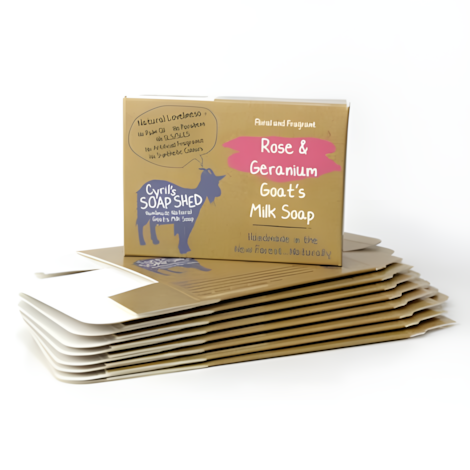
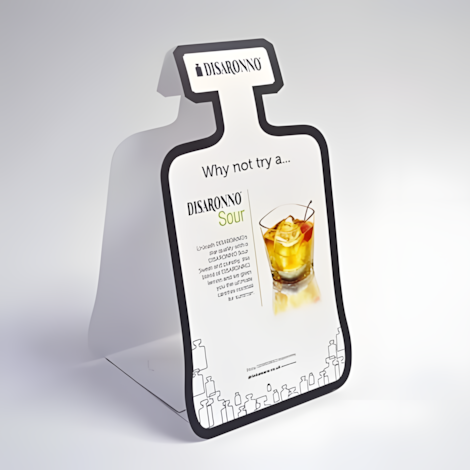
- Retail & product-based print: Packaging, swing tags, labels, point-of-sale displays
- Stationery & campaigns: Invitations, menus, bookmarks, vouchers, gift card holders
If you’re unsure whether your idea is suitable for die-cutting, a print specialist can offer quick guidance and suggest the most practical approach.
How the Die-Cutting Process Works
The process is highly efficient. While the technology behind die-making has evolved, the core method remains trusted throughout the industry for reliability and speed.
A typical die-cutting job includes the following steps:
- Brief & Specification You decide on the product, quantity, size and shape required.
- Die Creation A die-maker produces a custom die to match your chosen outline. This is generally a one-off cost.
- Printing Your artwork is printed onto sheets of paper or card, ready for finishing.
- Die-Cutting The printed sheets are placed into the die-cutting machine, where the die cleanly cuts the shape.
- Finishing Depending on the product, additional processes may be applied, such as creasing, laminating, folding or gluing.
- Packing & Delivery Your finished items are checked, packed and delivered ready for use.

Which Materials Can Be Die-Cut?
Traditional die-cutting is suitable for paper and card due to the physical action of the punched blade.
As a general guide:
As a general guide:
- Minimum material weight: approx. 170gsm (≈ 140 microns)
- Maximum material weight: approx. 500gsm (≈ 600 microns)
Microns measure paper thickness, expressed as thousandths of a millimetre.
Paper and card are ideal because the die can cut through the fibres cleanly without causing excessive wear to the tooling.
Die-Cutting vs Digital Cutting: What’s the Difference?
While both methods are used to create shaped print, the two technologies operate differently. Understanding the distinctions can help you choose the right approach.
| Traditional Die-Cutting | Digital Cutting (Digital Die-Cutting) |
|---|---|
| Uses a physical, custom-made die | Uses a computer-controlled blade to cut shapes |
| One-off cost to create the die | No die required |
| Extremely efficient for medium to large quantities | Ideal for shorter runs, prototypes and one-off projects |
| Very fast production once set up | Slower cutting time per sheet |
| Best suited to paper and card | Suitable for a wider range of materials including foamboard, correx and display boards |
| Highly consistent results across large volumes | Very accurate, but slightly slower for high-volume production |
If you need large quantities of a consistent shape, traditional die-cutting is usually the most efficient solution. If you require a small batch, a unique prototype or are working with thicker substrates, digital cutting may be more suitable.

Digital Cutting for Paper and Card
Digital cutting technology has advanced significantly and can produce high-quality “die-free” shapes on many paper and card stocks. Because no physical die is needed, this approach can be quicker and more cost-effective for short runs.
Although traditional die-cutting is still preferred for higher volumes due to speed and long-term economy, digital cutting is an excellent option for:
Although traditional die-cutting is still preferred for higher volumes due to speed and long-term economy, digital cutting is an excellent option for:
- Small quantity orders
- Bespoke or one-off projects
- Prototypes prior to full production
- Testing shape and fit before committing to a die
Common Mistakes to Avoid
To ensure you achieve the best outcome, consider the following points when planning a die-cut print project:
- Designing without a template It’s advisable to work from a cutter guide supplied by the print provider. This ensures artwork aligns correctly with the die.
- Placing text too close to the cut edge Allow a safe margin inside the cut line to ensure legibility and prevent accidental trimming of text or logos.
- Forgetting about bleed All artwork that touches the edge of the shape requires bleed to avoid unwanted white borders after cutting.
- Overly intricate shapes Very fine points or delicate, narrow details can be difficult to cut cleanly. A print specialist can advise if modifications are needed.
- Not considering folding or assembly For products with folds or locking mechanisms, ensure the design is functional as well as visually appealing. Structural samples can be invaluable.
Addressing these points early in your project helps avoid delays, reprints or unnecessary costs.
Is Die-Cutting Cost-Effective?
Die-cutting generally becomes more cost-effective as quantities increase. The main cost factor is the creation of the die, which is usually a one-time charge. Once made, it can often be used again for future print runs, reducing cost.
Digital cutting, by comparison, avoids the die cost entirely and may be more economical for small runs.
If you are unsure which route is the best value for your needs, a print specialist can provide guidance based on your quantity, timescale and end use.
Digital cutting, by comparison, avoids the die cost entirely and may be more economical for small runs.
If you are unsure which route is the best value for your needs, a print specialist can provide guidance based on your quantity, timescale and end use.
Need Support or Expertise?
If you’re exploring die-cutting for the first time — or want to refine your approach — it’s often helpful to speak to a print expert. They can advise on materials, shape suitability, artwork setup and the most cost-effective production method for your project.
A short conversation at the planning stage can save time and simplify decision-making later on.
A short conversation at the planning stage can save time and simplify decision-making later on.