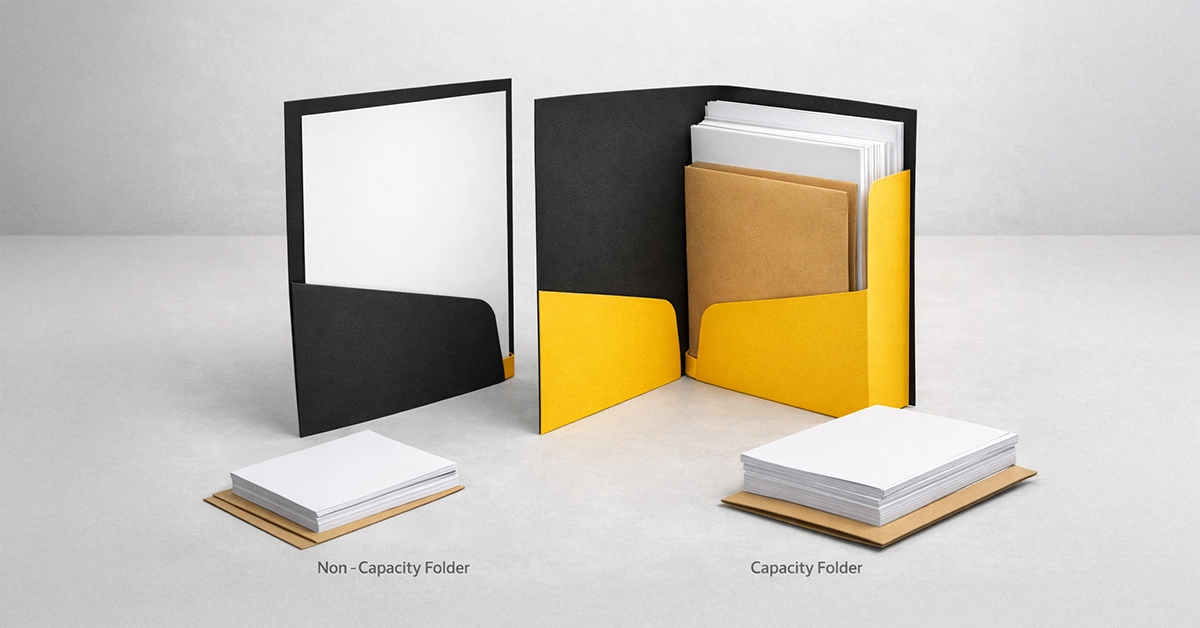
Choosing the right printed folders plays a significant role in how your documents are received, whether you are issuing training packs, presenting a client proposal or distributing event materials. Many UK businesses find the distinction between capacity and non-capacity folders confusing, which can lead to unnecessary costs or folders that simply do not suit the intended purpose.
This guide breaks down both options clearly, explains how they differ and shows you how to choose the most suitable folder for your project. You will also find a comparison table to support decision-making.
A presentation folder helps organise, protect and present documents while reinforcing your brand. The primary difference between capacity and non-capacity folders is whether the folder is designed to expand.
A non-capacity folder features flat pockets with no gusset. It offers a tidy, minimal finish and is ideal for projects requiring only a small amount of content.
Typical capacity:
A capacity folder includes a gusseted spine, allowing it to expand and hold significantly more content. Common gusset sizes include 5 mm and 10 mm.
Typical capacity:
Paper weight, finishing options and additional inserts will affect final capacity.
Non-capacity folders suit projects that prioritise simplicity and cost-efficiency while maintaining a professional appearance.
Non-capacity folders are not suitable for thick or multi-page document sets and can become misshapen if overfilled. If your content volume may increase over time, consider whether a capacity folder might be more practical.


Capacity folders are designed to hold more content securely while maintaining a polished, structured appearance.
Capacity folders require more storage space and cost slightly more to produce. They are best used when you have sufficient content to justify the additional structure.
| Feature | Non-Capacity Folder | Capacity Folder |
|---|---|---|
| Structure | Flat pockets, no gusset | Gusseted spine (e.g., 5 mm or 10 mm) |
| Typical Sheet Capacity | 1–10 sheets | 30–70 sheets depending on gusset |
| Appearance | Slim and minimal | Substantial and structured |
| Best For | Events, small packs, postal items | Reports, proposals, onboarding kits |
| Cost | Lower cost | Higher due to additional construction |
| Storage & Postage | Compact and lightweight | Bulkier and requires more room |
| Potential Issues | Overfilling can distort the folder | Under-filling may appear visually sparse |
When deciding between folder types, assess your content, audience and distribution method:
Match the folder style to your visual identity:
Selecting the most suitable size reduces waste and unnecessary material usage. Over-sized folders contribute to heavier deliveries and increased carbon output.
Regardless of whether you choose a capacity or non-capacity folder, printing decisions contribute significantly to the final impact.
These elements affect usability and help create a cohesive brand experience.
Choosing the wrong folder type can undermine your presentation. Typical mistakes include:
A straightforward content review before ordering helps prevent these issues.
A conference provider preparing 500 delegate packs includes only a schedule, map and two inserts. A non-capacity folder keeps the pack light, cost-effective and easy to distribute.
A training provider distributes onboarding materials including booklets, policy sheets and learning guides. A 10 mm capacity folder ensures all content fits neatly without compromising presentation.
These examples demonstrate how folder choice directly supports the clarity and usability of your materials.
When your folder matches the volume, purpose and audience of your content, your materials remain organised, protected and visually consistent. Selecting the correct type ensures your documents make the right impression and reach recipients in perfect condition.
If you want guidance on choosing the right folder specification or creating a design that works seamlessly with your content, we can help. Whether you need advice on capacity options, finishes or layout, feel free to reach out and start planning a well-structured, professional folder for your next project.

Unit 4-10 Stanton Road Ind. Est.
Stanton Road
Southampton
Hampshire
United Kingdom
SO15 4HU